
AI-assisted customer operations · October 16, 2026
AI-assisted Telegram customer support with human review
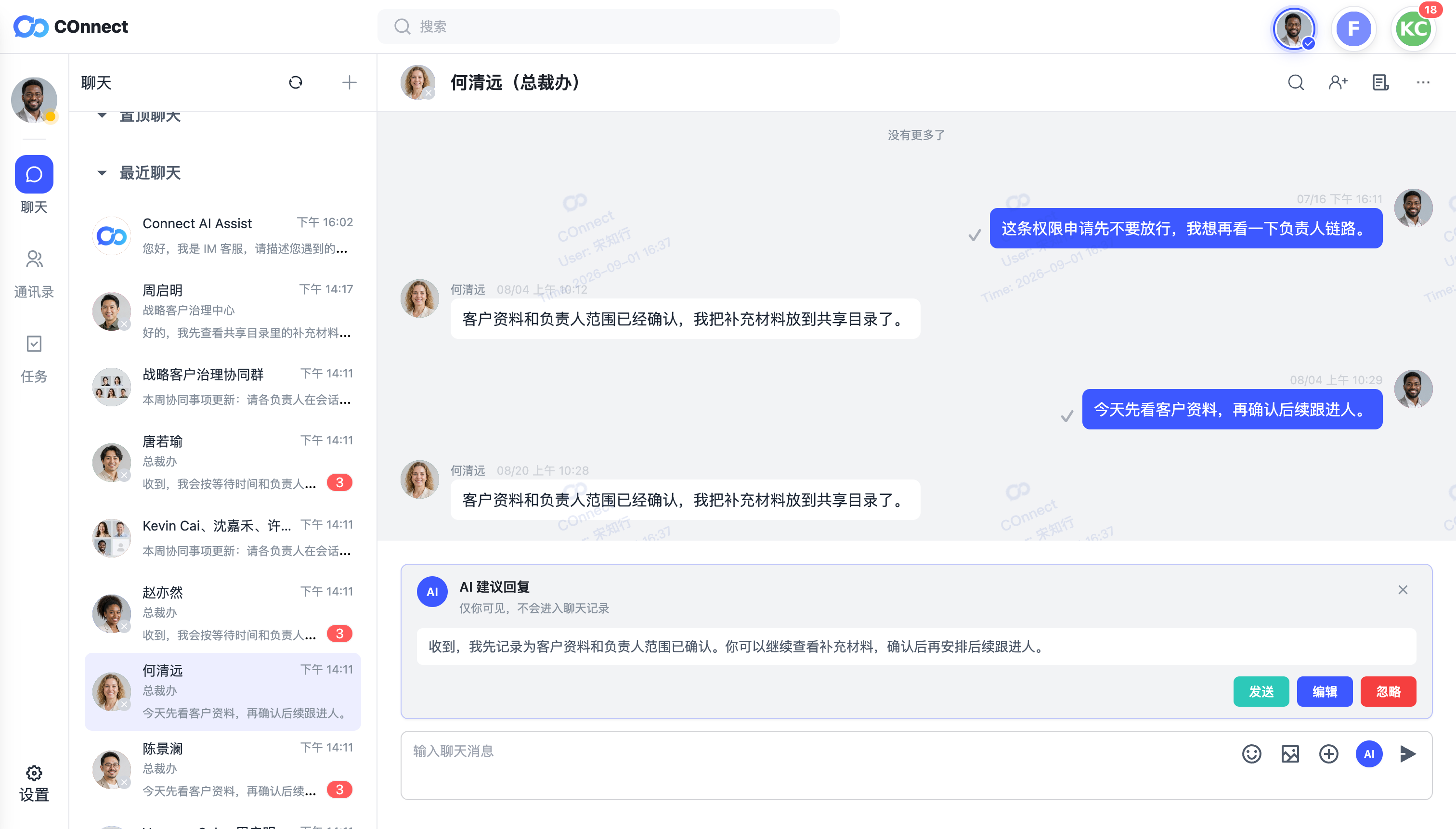
AI can reduce drafting time, but a suggested reply is not a customer decision. A safe workflow keeps the employee responsible for context, accuracy, sensitive details, and the final send action.
Why AI assistance needs an operating rule
A draft can sound confident while still missing the customer's latest request, the correct owner, a price or date, or an internal policy boundary. In a Telegram support workflow, a fast but incorrect answer can also be sent from the wrong account or leave a sensitive detail in the conversation.
The useful question is not whether a team uses AI. It is whether the team can show how a person checks the suggestion before it becomes a customer-facing message.
A five-step human-review workflow
1. Read the latest customer context first
Review the customer's newest message, current owner, source account, labels, and open follow-up before opening a suggestion. If the conversation has changed hands or been escalated, confirm the receiving employee has the right organization scope.
2. Treat the suggestion as a draft
Check the names, dates, quantities, commitments, language, and tone against the conversation. Do not assume that a fluent answer is a verified answer. If the context is incomplete, ask a clarifying question or continue the normal support workflow.
3. Remove unsupported claims and sensitive details
Delete promises, policy conclusions, discounts, or delivery dates that the employee cannot confirm. Do not add passwords, verification codes, payment credentials, API hashes, or session files to an AI-assisted reply or customer note.
4. Edit or dismiss deliberately
Use the edit action when the suggestion is a useful starting point but needs correction. Dismiss it when the message requires judgment, escalation, or a response that should be written from the actual customer context. A suggestion should never create pressure to send.
5. Send through the normal governed path
Before sending, confirm the target customer, source channel, and current owner. The final message remains subject to the organization's normal permissions, sensitive-content controls, and human review. If the action fails or remains pending, record the real state instead of treating the draft as a completed response.
What managers should review
- Whether employees can identify an AI draft separately from a sent customer message.
- Whether the current customer owner and source account are visible before sending.
- Whether sensitive-word and approval controls still apply to the final message.
- Whether employees know when to dismiss a suggestion and escalate to a teammate.
- Whether follow-up tasks and handoffs remain visible after the reply.
How COnnect supports the boundary
For supported COnnect customer conversations, AI assistance can provide reply drafts and conversation support while the employee remains responsible for checking and sending the final message. The Help Center describes AI suggestions as drafts: they do not automatically send messages, change ownership, or bypass sensitive-word and permission controls.
Availability and behavior depend on the supported client, account, permissions, and deployment configuration. COnnect does not present an AI suggestion as an approval result or as a replacement for Telegram's own account and session controls. See the AI and tasks guide, the sensitive-content controls guide, and the customer-context guide.
FAQ
Does COnnect automatically send an AI reply?
No. The suggestion is a draft. An employee must review it and use the normal send action.
Can an AI suggestion change the customer owner?
No. AI assistance does not change ownership. Responsibility remains an explicit team operation with its own permissions and handoff workflow.
Should teams use AI suggestions for sensitive decisions?
Use human judgment and the organization's approval or risk workflow for sensitive decisions. A fluent draft is not evidence that a policy, price, or commitment is approved.
Keep AI assistance accountable.
See how COnnect connects customer context, permissions, risk controls, and human follow-up around daily communication.
Talk to the enterprise team